
Know every agent running in your organization.
Guardbase discovers every coding agent, MCP server, and skill across your fleet, including the configuration behind them. From rollout to a full picture in minutes.
 Claude Code
  Gemini CLI
  Cursor Claude Code
  Codex
Codex  OpenCode
 You can't govern what you can't see.
Agents arrive bottom-up
From engineering to finance, people install coding agents like any other tool: whenever they need one. Security review never enters the picture.
Untrusted MCP servers and skills
Each one is instructions and code your agent will follow, usually installed without any review. For a malicious actor, that's a way into the agent. Snyk found prompt injections in 36% of the skills it analyzed. Source
Configuration is invisible
Permission settings, allowlists, and hooks decide what an agent can actually do. Nobody reviews them, and they differ on every laptop.
Everything that shapes your agent footprint.
Not just which agents are installed. The servers, skills, and configuration that decide what each one can do.
Every coding agent
Claude Code, Cursor, Codex, Gemini CLI, OpenCode, Amp, and more. Every install, on every laptop.
Local and remote servers
Including the ones configured but not currently running. If an agent can reach it, it shows up.
Skills, inspected
Which skills are installed and where. Skills that contain prompt-injection instructions or bundled scripts built to steer the agent get flagged.
The files that decide
Permission settings, allowlists, hooks, and MCP configs. The configuration that determines what an agent may do.
Risky changes, alerted
Routine changes just update the inventory. An unvetted MCP server or a flagged skill becomes an alert. Nothing else asks for your attention.
Tied to identity
Every finding mapped to a device and an employee, synced with your identity provider.
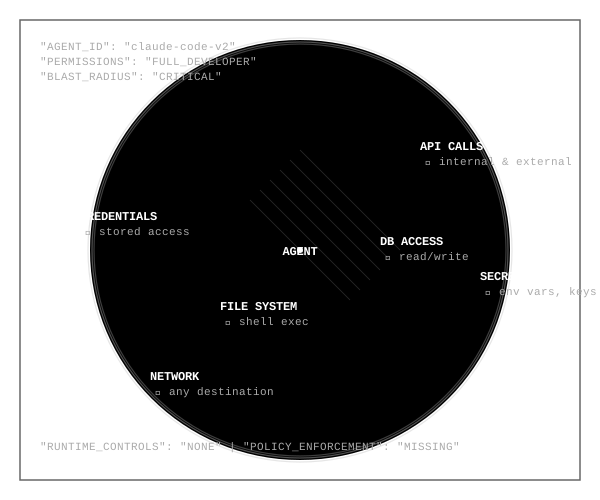
An inventory tells you what's installed. Blast radius tells you what it can do.
Guardbase statically analyses each agent setup and maps what it can reach: which shell commands it's allowed to run, and which MCP servers and scopes it can call. It flags installed skills that try to steer the agent with injected instructions or bundled scripts. Before anything goes wrong.
Rolled out in minutes, not quarters.
First results within minutes of rollout. Everything runs in your environment.
Roll out
Push a lightweight CLI to every laptop in your fleet through the MDM you already run, or without one. No resident endpoint agent.
Scan on schedule
The CLI runs as a scheduled job and inventories agents, MCP servers, skills, and configuration. How fresh the data is, is your choice of schedule.
See the map
Org-wide, per-device, and per-agent views, with alerts the moment a new agent or MCP server shows up.
Built to be trusted on every laptop.
Not an endpoint agent
A small CLI on a schedule. No resident process watching the machine, no performance tax.
Reads configs, not content
No file contents, no prompts, no keystrokes. Guardbase inventories tools, not people.
Runs in your environment
Inventory data stays in your environment, under your control.
Inventory is where control starts.
Agent Inventory deploys standalone. When you're ready, the same footprint becomes the foundation for runtime control and a trusted tool catalogue.
Common questions.
Yes. Inventory is fully standalone and a common starting point. Runtime control and the trusted catalogue build on the same footprint when you are ready.
macOS today. Windows and Linux are on the roadmap.
No. Guardbase currently provides documentation for Jamf and Intune, but the CLI can be rolled out without an MDM too.
No. The scan reads tool configurations and metadata: which agents, MCP servers, and skills are present and how they are configured. It never reads file contents, prompts, code, or activity.
Scans run on the schedule you configure, and the first results arrive within minutes of rollout.
Not today. Agent Inventory covers laptops, which is where agents are adopted first and reviewed least.
See what's running in your organization.
Get a free inventory scan and a full map of your agent footprint. First results within minutes.